.
1003 Handle REST Service
How to write Google App Script to handle REST Service
Objective
1. Create generic record utility functions
addRecord()
editRecord()
deleteRecord()
selectRecord()
selectRecords()
2. Create record utility manager ie manageRecord()
1) Create a spreadsheet
eg HandleRestService.

Create a sheet “persons”.
Set the first row…
tid
|
timestamp
|
name
|
pid
|
age
|
Set the field format for the fields especially tid field...

2) Open Code Editor within the spreadsheet
eg HandleRestService.

3) Edit the Script
We write few functions to perform specific tasks:
logGlobalVar()
|
Log the global var
|
doGet() and doPost()
|
To handle Get and Post request
|
handleResponse()
|
Read action value and respond
|
manageRecords
|
Handle record management request and return TextOutput
|
findInArray
|
Find string in the array
|
addRecords(), editRecords(), deleteRecords(), selectRecord(), selectRecords()
|
Record management functions
|
Test functions
|
To test for expected results
|
/*global var*/
var SCPID=ScriptApp.getScriptId(); /*script id*/
var SST=SpreadsheetApp.getActiveSpreadsheet(); /*active spreadsheet */
var SSTID=SpreadsheetApp.getActiveSpreadsheet().getId(); /*spreadsheet id*/
var SSTFILE=DriveApp.getFileById(SSTID); /*get file*/
var Folders = SSTFILE.getParents(); /*get parent collection*/
while (Folders.hasNext()) {
var Folder = Folders.next();
Logger.log(Folder.getName());
var FOLID = Folder.getId(); /*get id for first parent item*/
}
/*log the global var*/
function logGlobalVar(){
Logger.log("script id:"+SCPID);
Logger.log("sheet id:"+SSTID);
Logger.log("folder id:"+FOLID);
Logger.log("SST:"+SST.getName());
}
/* web request listeners */
function doGet(e) {return handleResponse(e);}
function doPost(e) {return handleResponse(e);}
/* handle action request */
function handleResponse(e) {
var lock = LockService.getPublicLock();
lock.waitLock(30000); // wait 30 seconds before conceding defeat.
try {
var action = e.parameter.action;
if (action == 'test') {
return getTest(e);
}else if (action == 'addperson') {
return manageRecords("addperson",e); //records command,parameter
}else if (action == 'editperson') {
return manageRecords("editperson",e);
}else if (action == 'deleteperson') {
return manageRecords("deleteperson",e);
}else if (action == 'selectperson') {
return manageRecords("selectperson",e);
}else if (action == 'selectpersons') {
return manageRecords("selectpersons",e);
}
}
catch (e) {/*if error return this*/return ContentService.createTextOutput(JSON.stringify({"result": "error","error": e})).setMimeType(ContentService.MimeType.JSON);}
finally { /*release lock*/ lock.releaseLock();}
}
/* handle records management */
function manageRecords(command,e){
var output;
switch (command){
case "addperson":
output=addRecord("persons",e);
break;
case "editperson":
output=editRecord("persons",e);
break;
case "deleteperson":
output=deleteRecord("persons",e);
break;
case "selectperson":
output=selectRecord("persons",e);
break;
case "selectpersons":
output=selectRecords("persons",e);
break;
}
return ContentService
.createTextOutput(JSON.stringify(output))
.setMimeType(ContentService.MimeType.JSON);
}
/* findInArray(array,colno,searchvalue){} */
/* find a string in array row and columns */
/* if colnos is null then concat all cols */
function findInArray(array,colnos,searchvalue){
output=[];
for (var rowno in array){
if (colnos==null){ /*concat cols*/
//Logger.log(array[rowno]);
var strtest=JSON.stringify(array[rowno]);
var n = strtest.search(searchvalue);
if (n>=0){
array[rowno].unshift(rowno);
output.push(array[rowno]);
}
}/*if (colnos==null)*/
else{
var strtest='';
for(var colno in colnos){
strtest=strtest.concat((strtest==''?'':','),array[rowno][colnos[colno]]);
}
//Logger.log(strtest);
var n = strtest.search(searchvalue);
if (n>=0){
array[rowno].unshift(rowno);
output.push(array[rowno]);
}/*if*/
}/*else*/
}/*row*/
return output;
}/*function findInArray*/
function testFindInArray(){
var array=[['dadu','0','badi'],['didi','1','bada'],['dida','2','bidi'],['didu','3','bidu']];
//output=findInArray(array,null,"da");
//Logger.log(output);
//output=findInArray(array,[2],"da");
//Logger.log(output);
output=findInArray(array,[0,2],"da");
Logger.log(output);
}
/* ref: https://github.com/AishwaryT/Google-app-script-crud/blob/master */
/* add record */
function addRecord(recordsname, e) {
var Sheet = SST.getSheetByName(recordsname);
try {
// we'll assume header is in row 1 but you can override with header_row in GET/POST data
var headRow = e.parameter.header_row || 1;
var headers = Sheet.getRange(headRow, 1, 1, Sheet.getLastColumn()).getValues()[0];
var rownum = Sheet.getLastRow() + 1; // get next row
var row = [];
var d = new Date();
// loop through the header columns
for (colno in headers) {
if (headers[colno] == "tid") { // special case if you include a 'timestamp' column
row.push(d.getTime());
} else if (headers[colno] == "timestamp") { // special case if you include a 'timestamp' column
row.push(d);
} else { // else use header name to get data
row.push(e.parameter[headers[colno]]);
}
}
// more efficient to set values as [][] array than individually
Sheet.getRange(rownum, 1, 1, row.length).setValues([row]);
// return json success results with the row number of the newly added record
return rownum
} catch (e) {
// if error return this
return 0
}
}
/* edit record */
function editRecord(recordsname, e) {
var Sheet = SST.getSheetByName(recordsname);
try {
// we'll assume header is in row 1 but you can override with header_row in GET/POST data
var headRow = e.parameter.header_row || 1;
var headers = Sheet.getRange(headRow, 1, 1, Sheet.getLastColumn()).getValues()[0];
var array =Sheet.getRange(2, 1, Sheet.getLastRow()-1, Sheet.getLastColumn()).getValues();
var found=findInArray(array,[0],e.parameter['tid']);/*found is array*/
if (found.length>0){
var rownum=Number(found[0][0]);/*pickup the first item of the first row ie the array row num*/
rownum+=2;/*change from zero-based to one-based and add the headRow*/
}
//Logger.log(e.parameter['tid']);
//Logger.log(rownum);
if (rownum == undefined) {
//row not found
return -1
}
var row = [];
var d = new Date();
// loop through the header columns
for (i in headers) {
if (headers[i] == "tid") { // special case if you include a 'tid' column
row.push(e.parameter['tid']);
} else if (headers[i] == "timestamp") { // special case if you include a 'timestamp' column
row.push(d);
} else { // else use header name to get data
row.push(e.parameter[headers[i]]);
}
}
Sheet.getRange(rownum, 1, 1, row.length).setValues([row]);
// return json success results with the row number of the newly added record
return rownum;
} catch (e) {
// if error return this
return 0
}
}
/* test edit record */
function testEditRecord(){
var parameter={action:'editrecord',tid:'1499613316279',name:'vovoi',pid:'7474',age:'44'};
var e={parameter:parameter};
Logger.log(editRecord('persons', e));
}
/* delete record */
function deleteRecord(recordsname, e) {
var Sheet = SST.getSheetByName(recordsname);
try {
// we'll assume header is in row 1 but you can override with header_row in GET/POST data
var headRow = e.parameter.header_row || 1;
var headers = Sheet.getRange(headRow, 1, 1, Sheet.getLastColumn()).getValues()[0];
var array =Sheet.getRange(2, 1, Sheet.getLastRow()-1, Sheet.getLastColumn()).getValues();
var found=findInArray(array,[0],e.parameter['tid']);/*found is array*/
if (found.length>0){
var rownum=Number(found[0][0]);/*pickup the first item of the first row ie the array row num*/
rownum+=2;/*change from zero-based to one-based and add the headRow*/
}
//Logger.log(e.parameter['tid']);
//Logger.log(rownum);
if (rownum == undefined) {
//row not found
return -1
}
// delete row by rownum
Sheet.deleteRow(rownum);
return rownum
} catch (e) {
// if error return this
return 0
}
}
/* test delete record */
function testDeleteRecord(){
var parameter={action:'deleterecord',tid:'1499613316279'};
var e={parameter:parameter};
Logger.log(deleteRecord('persons', e));
}
/* select record */
function selectRecord(recordsname, e) {
var Sheet = SST.getSheetByName(recordsname);
try {
// we'll assume header is in row 1 but you can override with header_row in GET/POST data
var headRow = e.parameter.header_row || 1;
var headers = Sheet.getRange(headRow, 1, 1, Sheet.getLastColumn()).getValues()[0];
var array =Sheet.getRange(2, 1, Sheet.getLastRow()-1, Sheet.getLastColumn()).getValues();
var found=findInArray(array,[0],e.parameter['tid']);/*found is array*/
if (found.length>0){
var rownum=Number(found[0][0]);/*pickup the first item of the first row ie the array row num*/
rownum+=2;/*change from zero-based to one-based and add the headRow*/
}
//Logger.log(e.parameter['tid']);
//Logger.log(rownum);
if (rownum == undefined) {
//row not found
return -1
}
var row = {};
row['_row']=rownum;
var values = Sheet.getRange(rownum, 1, 1, Sheet.getLastColumn()).getValues()[0];
for (i in headers) {
row[headers[i]] = values[i];
}
// return json success results with the row
return row;
} catch (e) {
// if error return this
return e;
}
}
/* test select record */
function testSelectRecord(){
var parameter={action:'selectrecord',tid:'1498794221687'};
var e={parameter:parameter};
Logger.log(selectRecord('persons', e));
}
/* get all records */
function selectRecords(recordsname, e) {
var Sheet = SST.getSheetByName(recordsname);
try {
// we'll assume header is in row 1 but you can override with header_row in GET/POST data
var headRow = e.parameter.header_row || 1;
var headers = Sheet.getRange(headRow, 1, 1, Sheet.getLastColumn()).getValues()[0];
var rownum = Sheet.getLastRow()-1;
//Logger.log(e.parameter['tid']);
//Logger.log(rownum);
if (rownum == undefined||rownum==1) {
//row not found
return -1
}
var rows = [];
var values = Sheet.getRange(2, 1, Sheet.getLastRow(), Sheet.getLastColumn()).getValues();
for (var i = 0; i < values.length - 1; i++) {
var row = {};
row['_row']=i+2;/*change from zero-based to one-based and add the headRow*/
for (j in headers) {
row[headers[j]] = values[i][j];
}
rows.push(row);
}
return rows;
} catch (e) {
return e;
}
}
/* test select records */
function testSelectRecords(){
var parameter={action:'selectrecords'};
var e={parameter:parameter};
Logger.log(selectRecords('persons', e));
}
|
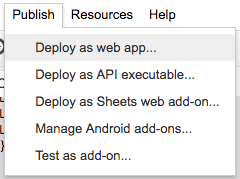
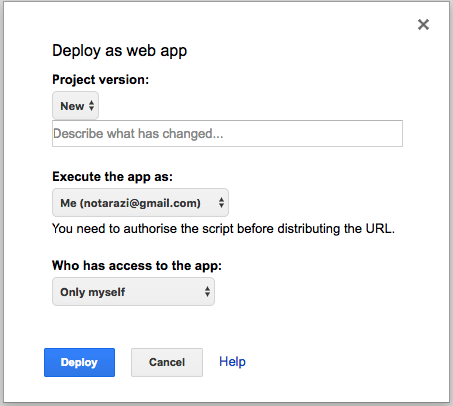
4) Publish as Web App
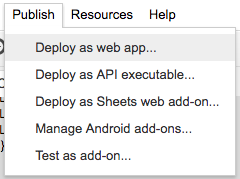
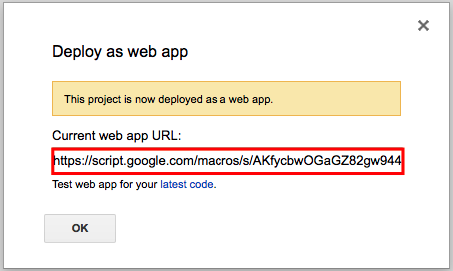
Deploy
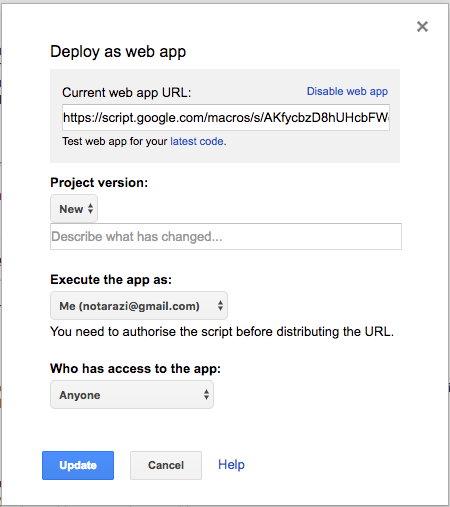
Execute the app using your account (because the app needs to access the spreadsheet that is privately accessible by your account only) but allow anyone to access the apps.
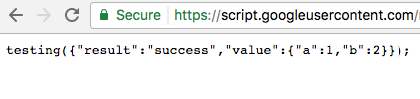
5) Test
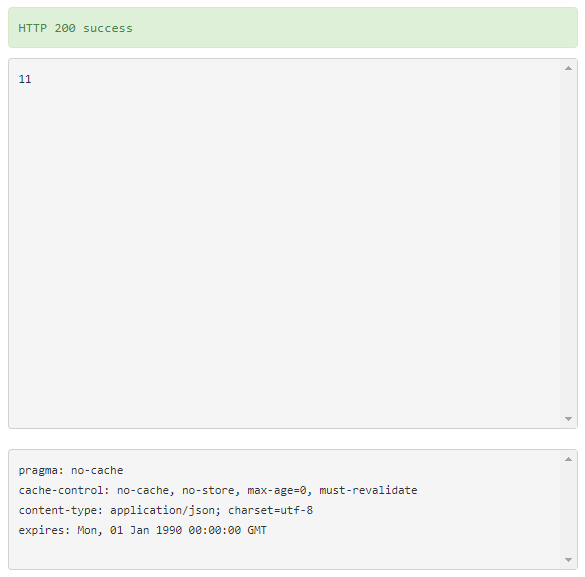
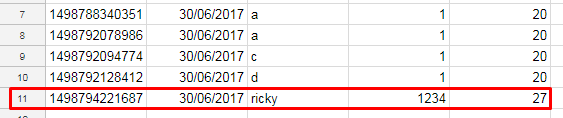
You can test by entering the URL request with parameters eg
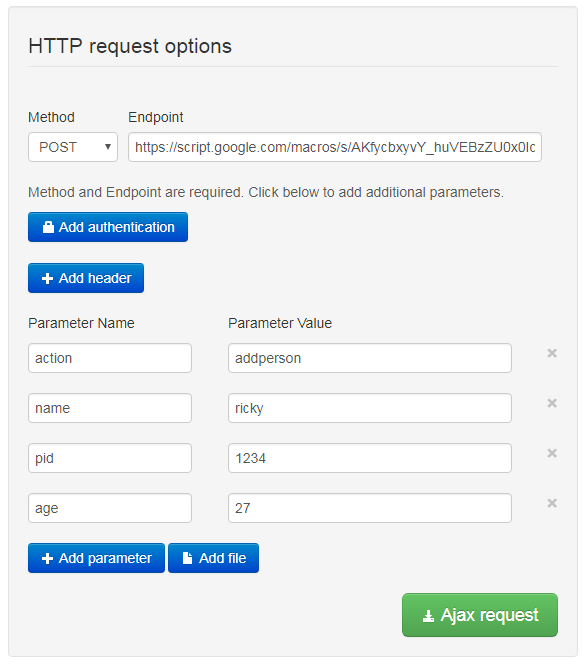
COPY:
https://docs.google.com/spreadsheets/d/1rJ5IsjPr5HFQFCIZrajxd6nNU9fZGbxhO6aEm8gpFSQ/edit?usp=sharing
REFS:
.