Labels

Learn the powerful enterprise adaptable database:

Getting Started With ADABAS & Natural

Friday, March 10, 2017

Create Custom Survey with Google Apps 2


.
Creating Custom Survey with Google Apps 2
Google Forms—along with Docs, Sheets, and Slides—is part of Google's online apps suite of tools to help you get more done in your browser for free. It's easy to use and one of the simplest ways to save data directly to a spreadsheet - zapier.

OBJECTIVE

1. Add Script Library to help us doing CRUD operations.
2. Autogenerate Survey Form and its linked Spreadsheet.
Copy demo document from the previous tutorial. Rename the sheet and the script to _survey2.

1) Add Script Library (objDB)

objDB is a Google Script Library that encapsulates working with data from a spreadsheet and from a JDBC-connected database,  using the same interface for both data sources.
Add the following ID: 1o_O_ZkZm1GuTF5J1LYkfntUpiaT0sxDHyhZXL4fQma89mNIB65epbL6H
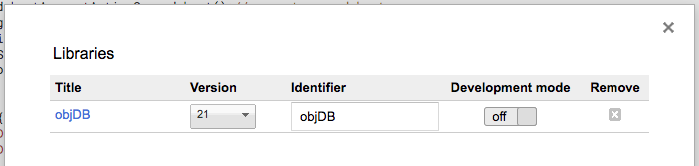
2) Write Codes To Generate Survey Forms and Linked Spreadsheet

//get required object
   var ss = SpreadsheetApp.getActiveSpreadsheet();//current spreadsheet
   var SSID = ss.getId(); //SSID
   var SSDOC = DriveApp.getFileById(SSID);
   var Folders = SSDOC.getParents();
   var Folder = Folders.next();
   var FOLDERID = Folder.getId(); //FOLDERID
function showId(){
  Logger.log("SSID:"+SSID);
  Logger.log("FOLDERID:"+FOLDERID);
}
function doGet(e) {
    return handleResponse(e);
}
function doPost(e) {
    return handleResponse(e);
}
function handleResponse(e) {
    var lock = LockService.getPublicLock();
    lock.waitLock(30000); // wait 30 seconds before conceding defeat.
    try {
      var action = e.parameter.action;
      if (action == 'getsheet') {
            return getSheet(e);
      }
    } catch (e) {
        // if error return this
        return ContentService
            .createTextOutput(JSON.stringify({
                "result": "error",
                "error": e
            }))
            .setMimeType(ContentService.MimeType.JSON);
    } finally { //release lock
        lock.releaseLock();
    }        
}  
function getSheet(e){  
  var data =[];
  //check if parameter is undefined
  if ((typeof(e) === "undefined")||
      (typeof(e.parameter) === "undefined")||
    (typeof(e.parameter.sheet) === "undefined")) {
    data.push({'sheet':'undefined'});
  }
  //else, process request parameter values
  else {
    var SHEETNAME=e.parameter.sheet;
    data = SpreadsheetApp.getActiveSpreadsheet().getSheetByName(SHEETNAME).getDataRange().getValues();
  }
  return ContentService
  .createTextOutput(JSON.stringify({
    "result": "success",
    "values": data
  }))
  .setMimeType(ContentService.MimeType.JSON);
}
function createForms(){
  var db = objDB.open(SSID);
  grouprows = objDB.getRows( db, 'groups' );   //get all rows in the groups sheet


  grouprow =grouprows[0] //select only the first row, not including the header row
  var Gid=grouprow.Gid;
  var filename=grouprow.Group + "~"+ grouprow.SubGroup;

  //create the form
  var form = FormApp.create(filename);
  var formFile = DriveApp.getFileById( form.getId() );
  DriveApp.getFolderById(FOLDERID).addFile( formFile );
  //create the sheet
  var sheet = SpreadsheetApp.create(filename);  
  var sheetFile  = DriveApp.getFileById( sheet.getId() );
  DriveApp.getFolderById(FOLDERID).addFile( sheetFile );  

  /*when we create a document, it will be placed both in the parent folder and root folder*/
  /*so we need to remove them from the root folder*/
  DriveApp.getRootFolder().removeFile(formFile);
  DriveApp.getRootFolder().removeFile(sheetFile);
     
  // Link Form to Spreadsheet
  form.setDestination(FormApp.DestinationType.SPREADSHEET, sheetFile.getId());  

  // Update form properties via chaining.
  form.setTitle(filename)
     .setDescription(grouprow.SubGroup)
     .setConfirmationMessage('Thanks for responding!')
     .setAllowResponseEdits(true)
     .setAcceptingResponses(true);  
     
  // Update survey master file
  objDB.updateRow( db, 'groups', {FormId:form.getId(),SheetId:sheet.getId()}, {Gid:Gid } )  

  //get questions from the sheet questions
  //specify the colums that we want to extract ie ['itype','mtype','descriptions']
  //specify the condition based on JSON data format ie SubGroup contains grouprow.SubGroup value
  rows = objDB.getRows( db, 'questions', ['itype','mtype','description'], {SubGroup:grouprow.SubGroup} );
  var questions=[];

  //prepare the questions array
  rows.forEach(function (row) {
    if (row.itype=='t'){return true;} //skip the title row
    questions.push(row.description);  // push the remaining rows
  });

  //create grid item
  //add questions array to grid item
  var item = form.addGridItem();
  item.setTitle('Rate your preference')
     .setRows(questions)
     .setColumns(['Strongly Disagree', 'Disagree', 'Not Sure','Agree', 'Strongly Agree']);


  //return response
  return ContentService
  .createTextOutput(JSON.stringify({
    "result": "success",
    "values": grouprow
  }))
  .setMimeType(ContentService.MimeType.JSON);  
}  
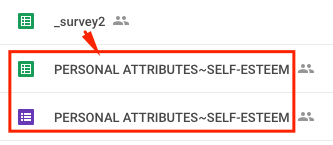
Run the function.
Since this is a one-off task, we may not need to include this function in the Web App.

DEMO

REFERENCES


.

Create Custom Survey with Google Apps 1


.
Creating Custom Survey with Google Apps 1

OBJECTIVE

1. Create Survey Data Sheet
2. Create Code to output Survey Data Sheet in JSON Format

Google Apps Script is a JavaScript cloud scripting language that provides easy ways to automate tasks across Google products and third party services and build web applications. 

1) Create Google Sheet
Name: _survey1
Sheet: groups, questions
Sheet: groups (GREEN = reserved for future use)
Gid
Group
SubGroup
FormId
SheetId
101
PERSONAL ATTRIBUTES
SELF-ESTEEM
Sheet: questions (GREEN = reserved for future use)
Gid
Group
SubGroup
itype
mtype
description
answer
scores
101
PERSONAL ATTRIBUTES
SELF-ESTEEM
t
0
To what extend do the statements below describe you?
101
PERSONAL ATTRIBUTES
SELF-ESTEEM
q
a
1. In general, you are satisfied with yourself.
101
PERSONAL ATTRIBUTES
SELF-ESTEEM
q
b
2. At times you think you are no good at all.
101
PERSONAL ATTRIBUTES
SELF-ESTEEM
q
a
3. You feel that you have a number of good qualities.
101
PERSONAL ATTRIBUTES
SELF-ESTEEM
q
a
4. You can do things as well as most other people.
101
PERSONAL ATTRIBUTES
SELF-ESTEEM
q
b
5. You feel you do not have much to be proud of.
101
PERSONAL ATTRIBUTES
SELF-ESTEEM
q
b
6. You feel useless at times.
101
PERSONAL ATTRIBUTES
SELF-ESTEEM
q
a
7. You feel that you are at least as good as other people.
101
PERSONAL ATTRIBUTES
SELF-ESTEEM
q
b
8. You wish you could have more respect for yourself.
101
PERSONAL ATTRIBUTES
SELF-ESTEEM
q
b
9. Sometimes you think of yourself as a bad person.
101
PERSONAL ATTRIBUTES
SELF-ESTEEM
q
a
10. You take a positive attitude toward yourself.

2) Add Code Scripts

2.1) Setup Function

//get required object
  var ss = SpreadsheetApp.getActiveSpreadsheet();//current spreadsheet
  var SSID = ss.getId(); //SSID
  var SSDOC = DriveApp.getFileById(SSID);
  var Folders = SSDOC.getParents();
  var Folder = Folders.next();
  var FOLDERID = Folder.getId(); //FOLDERID

function showId(){
 Logger.log("SSID:"+SSID);
 Logger.log("FOLDERID:"+FOLDERID);
}
Run the function.
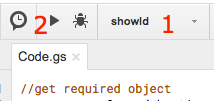
        1. Select the function name, showid
        2. Click Run button
Select View/Logs.
Logs should display the ID of the required objects that may be needed later on.

2.2) Response Handling Function

//get required object
   var ss = SpreadsheetApp.getActiveSpreadsheet();//current spreadsheet
   var SSID = ss.getId(); //SSID
   var SSDOC = DriveApp.getFileById(SSID);
   var Folders = SSDOC.getParents();
   var Folder = Folders.next();
   var FOLDERID = Folder.getId(); //FOLDERID
function showId(){
  Logger.log("SSID:"+SSID);
  Logger.log("FOLDERID:"+FOLDERID);
}
function doGet(e) {
    return handleResponse(e);
}
function doPost(e) {
    return handleResponse(e);
}
function handleResponse(e) {
    var lock = LockService.getPublicLock();
    lock.waitLock(30000); // wait 30 seconds before conceding defeat.
    try {
      var action = e.parameter.action;
      if (action == 'getsheet') {
            return getSheet(e);
      }
    } catch (e) {
        // if error return this
        return ContentService
            .createTextOutput(JSON.stringify({
                "result": "error",
                "error": e
            }))
            .setMimeType(ContentService.MimeType.JSON);
    } finally { //release lock
        lock.releaseLock();
    }        
}  
function getSheet(e){  
  var data =[];
  //check if parameter is undefined
  if ((typeof(e) === "undefined")||
      (typeof(e.parameter) === "undefined")||
    (typeof(e.parameter.sheet) === "undefined")) {
    data.push({'sheet':'undefined'});
  }
  //else, process request parameter values
  else {
    var SHEETNAME=e.parameter.sheet;
    data = SpreadsheetApp.getActiveSpreadsheet().getSheetByName(SHEETNAME).getDataRange().getValues();
  }
  return ContentService
  .createTextOutput(JSON.stringify({
    "result": "success",
    "values": data
  }))
  .setMimeType(ContentService.MimeType.JSON);
}
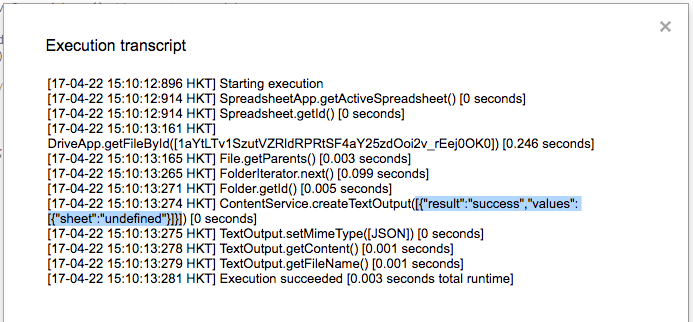
Run the function getSheetQuestions.
Select menu View/Execution Transcript

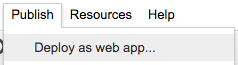
2.3) Deploy Code as Web App

Call the URL via web browser,
Invalid URL parameter values will get the following response.
Eg: <<Your Web App URL>>
{"result":"success","values":[{"sheet":"undefined"}]}
Valid URL parameter values will get the following response.
Eg: <<Your Web App URL>>?action=getsheet&sheet=questions
{"result":"success","values":[["Gid","Group","SubGroup","itype","mtype","description","answer","scores"],[101,"PERSONAL ATTRIBUTES","SELF-ESTEEM","t",0,"To what extend do the statements below describe you?","",""],[101,"PERSONAL ATTRIBUTES","SELF-ESTEEM","q","a","1. In general, you are satisfied with yourself.","",""],[101,"PERSONAL ATTRIBUTES","SELF-ESTEEM","q","b","2. At times you think you are no good at all.","",""],[101,"PERSONAL ATTRIBUTES","SELF-ESTEEM","q","a","3. You feel that you have a number of good qualities.","",""],[101,"PERSONAL ATTRIBUTES","SELF-ESTEEM","q","a","4. You can do things as well as most other people.","",""],[101,"PERSONAL ATTRIBUTES","SELF-ESTEEM","q","b","5. You feel you do not have much to be proud of.","",""],[101,"PERSONAL ATTRIBUTES","SELF-ESTEEM","q","b","6. You feel useless at times.","",""],[101,"PERSONAL ATTRIBUTES","SELF-ESTEEM","q","a","7. You feel that you are at least as good as other people.","",""],[101,"PERSONAL ATTRIBUTES","SELF-ESTEEM","q","b","8. You wish you could have more respect for yourself.","",""],[101,"PERSONAL ATTRIBUTES","SELF-ESTEEM","q","b","9. Sometimes you think of yourself as a bad person.","",""],[101,"PERSONAL ATTRIBUTES","SELF-ESTEEM","q","a","10. You take a positive attitude toward yourself.","",""]]}

DEMO

REFERENCES


.